Product · Interaction Design · Android
Priority, location, and route
Redesigning a restocking list for warehouse workers on Zebra Android devices
Flink Hub App · 2026 · Senior Product Designer
Outcome & Impact
Missing-item chargebacks dropped by 37%, against a target of 20%
Full rollout completed across 150+ warehouses in two weeks
OAs reported significantly less time spent deciding what to restock and fewer urgent restock requests mid-shift
The app that runs a warehouse
Flink’s warehouse workers (OAs, or Operational Associates) spend their shifts picking orders, receiving inbound stock, and restocking shelves. All of it is coordinated by the Hub App, running on Android Zebra devices across 150+ warehouses in Germany and the Netherlands.
Restocking is one of the most frequent tasks in the warehouse. As orders are picked and shelves empty, products need to move from the backstock area to the front stock. The app generates restocking tasks automatically when stock runs low, but demand doesn’t always follow a predictable pattern. When a product runs out unexpectedly mid-shift, an OA can trigger an urgent restock directly from the shelf, creating a critical-priority task on the spot.
Over time, this produced a queue of restocking items across multiple priority levels, from critical to low. The problem was that none of it was visible in the app.

The original restocking list, before priority or filtering was visible.
A long list with no signal
When an OA opened the restocking section, they saw a single long list. There were no priority indicators, visual hierarchy, or any way to filter or sort.
Workers had to rely on experience and judgment to decide what to restock first, a mental task layered on top of an already physically demanding job. For newer OAs, it was genuinely confusing. For everyone, it was slower than it needed to be.
Poor restocking prioritization was the leading cause of missing-item chargebacks across the warehouse network, accounting for more than 80% of cases in some hubs.
It’s not just about urgency
Early assumptions pointed to priority as the main missing piece. User research shifted the framing.
OAs explained that restocking isn’t always an emergency. When shelves aren’t critically low, they prefer to restock by location. As one OA put it:
“Picking up everything near shelf 22, in a single trip rather than walking back and forth across the warehouse. The priority of an item matters, but so does the route.”
The real need: let me build my own restocking list based on what matters right now, whether that’s priority, location, category, or some combination.
From AI prototype to shipped feature
I started with Figma Make to generate early-stage screen ideas, exploring how priority tags might work visually and how filters could surface without cluttering the list. This gave me a rough canvas to react to before investing in refined design. Once I had a direction I believed in, I brought the work into Figma and refined from there.
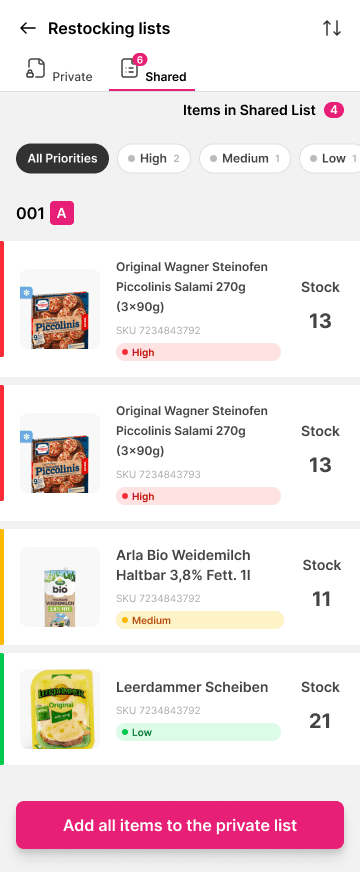
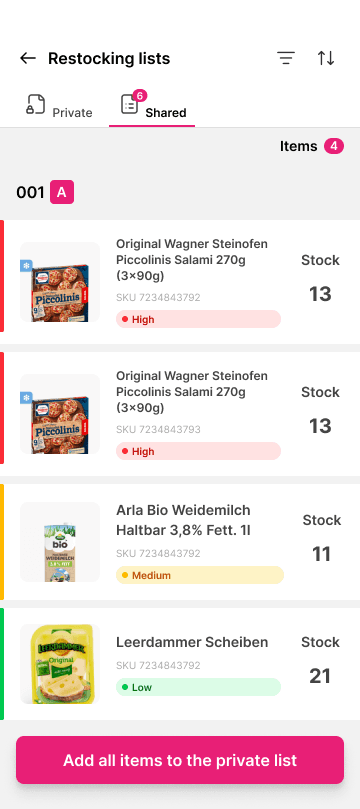

Early Figma Make exploration of priority tags and filter surfacing.
The solution added priority tags, category and priority filtering, shelf location on each item, and sorting controls, so workers could adapt the view to whatever the shift actually needed.
One new component came out of this work: a bottom sheet for the filter and sort controls. It didn’t exist in the app before. It later became the first component validated through the new design system pipeline, the same Claude Code and Figma MCP workflow described in the Design System case.

Walking OAs through the redesign during hub visits and critique.
The designs went through a critique session with the design team. After incorporating the feedback, I visited a few Berlin hubs to walk OAs through the designs directly and collect final reactions. The response was positive. From there, I finalized the complete interaction flow in Figma and handed it off to development.

The finalized interaction flow, ready for development handoff.
Clearer lists, faster restocking
We rolled out the feature in stages, tracking key metrics throughout to monitor delivery quality. The full rollout to 150+ warehouses completed in two weeks.
OAs reported that the task had become significantly clearer:
“Now it’s much clearer which items I need to restock first. I don’t need to ask whoever is doing picking which ones they think are running low.”
“I use the urgent restock button a lot less now. I spend less time wondering if an item is actually out of stock or just fallen to a nearby shelf.”
Missing-item chargebacks caused by restocking prioritization dropped by 37%. A hub manager put it simply:

The bottom sheet component, designed here for the first time, was later used to validate the new design system pipeline, becoming the first component tested end-to-end through the Claude Code and Figma MCP workflow.